Let Claude Code, Claude, Cursor, or any MCP client act in your product as the signed-in user: guarded host tools, vendo_make for screens, and the screen landing on your own page.
The AI SDK and Mastra
walkthroughs are for an agent you run in process with createVendo. Open the
MCP door instead and an agent you do not run acts in
your product as the person who signed in, through the same guard, approvals,
and audit your own surfaces use.Nothing to build on the agent’s side: it reads the door’s tools/list and
calls what it finds — your host actions, and Vendo’s own vendo_make.
Status: experimental, the same label the MCP door
carries: real, guard-bound, covered by protocol-level e2e, but out of the
main quickstart until the attended live-client matrix is
green.
// app/.well-known/[...vendo]/route.tsimport { wellKnownVendoHandler } from "@vendoai/vendo/server";import { vendo } from "@/lib/vendo";export const { GET, POST } = wellKnownVendoHandler(vendo);
Your existing catch-all route already serves the transport, and
npx vendo doctor checks the wiring. The adapter contract and the consent page
are on MCP door.
The OAuth is nobody’s code. The door answers the client’s first
unauthenticated request with the RFC 9728 challenge; the client registers
itself through dynamic client registration, runs PKCE, and sends the person to
your login and the door’s own consent page.The door also serves a page for people at
https://your-app.example.com/api/vendo/mcp/connect — your product’s name, the
URL to paste, and per-client steps for Claude, ChatGPT, and Cursor. Link users
to it from your settings.
Signing in is the same OAuth dance, run by Claude Code itself. The skill is the
only thing the plugin adds beyond the connection: when an answer wants to be
looked at instead of read out, how to phrase the request, when to name a
destination, and never to describe a screen it has not seen. Source:
examples/claude-code-plugin.
prose — what the person wants, in the agent’s own words. No component names, no layout, and no figures the agent computed: the screen binds live host data itself and hardcoded numbers fail its checks
context
background the product cannot see from its side: what the person said earlier in that conversation, a constraint they mentioned
app
change one specific existing app, by id or by the name the person used. Left out, Vendo decides whether to continue the last one or start something new
slot
the id of a slot in your product. The screen lands there instead of in the person’s apps list
vendo_make answers with four fields of words, never UI:
{ "id": "app_790892b0…", "title": "August Spending", "status": "ready", "say": "August Spending is on your screen."}
say is one line in the person’s voice, written to be said close to verbatim.
status is "ready", "building", or "failed", and "building" is an
honest answer rather than an error — an escalated build outlives the call, and
there is nothing to poll. The agent never receives the tree, the components, a
payload, or a URL, which is exactly what stops it narrating a screen it cannot
see. Pixels go server → your page; words go to the agent.
By default, the person’s own apps list in your product. Pass slot and it
lands in that spot on your page instead — the same <VendoSlot> your
in-product surfaces fill:
// app/page.tsx — a slot an outside agent can target by idimport { VendoSlot } from "@vendoai/ui/chrome";<VendoSlot id="home-hero"> <YourOriginalCard /></VendoSlot>
Add @vendoai/ui as a direct dependency. Empty, the slot renders your own
children; targeted, it shows a build skeleton, then the live screen or the
failure with a retry — no blank hole in any state. One app per slot per person:
placing a second one evicts the first.Slot ids are yours, and nothing enumerates them for an outside agent: tell the
agent the id, or let the person say it. The plugin skill is taught never to
invent one — an invented id puts the screen where nobody is looking, and that
does not look like an error.vendo_apps_pin and vendo_apps_unpin move an app the person already has in
and out of a slot. Both are writes, judged like any other write: under a
cautious policy the first one parks in your approvals queue. The routes
behind all three are in HTTP routes.
Running your own agent in your own backend as well? Its tool outputs render
inline in that chat with <VendoToolResult> — see
Embeds and envelopes. Over MCP the slot is the
destination, and the outside agent’s own chat stays text.
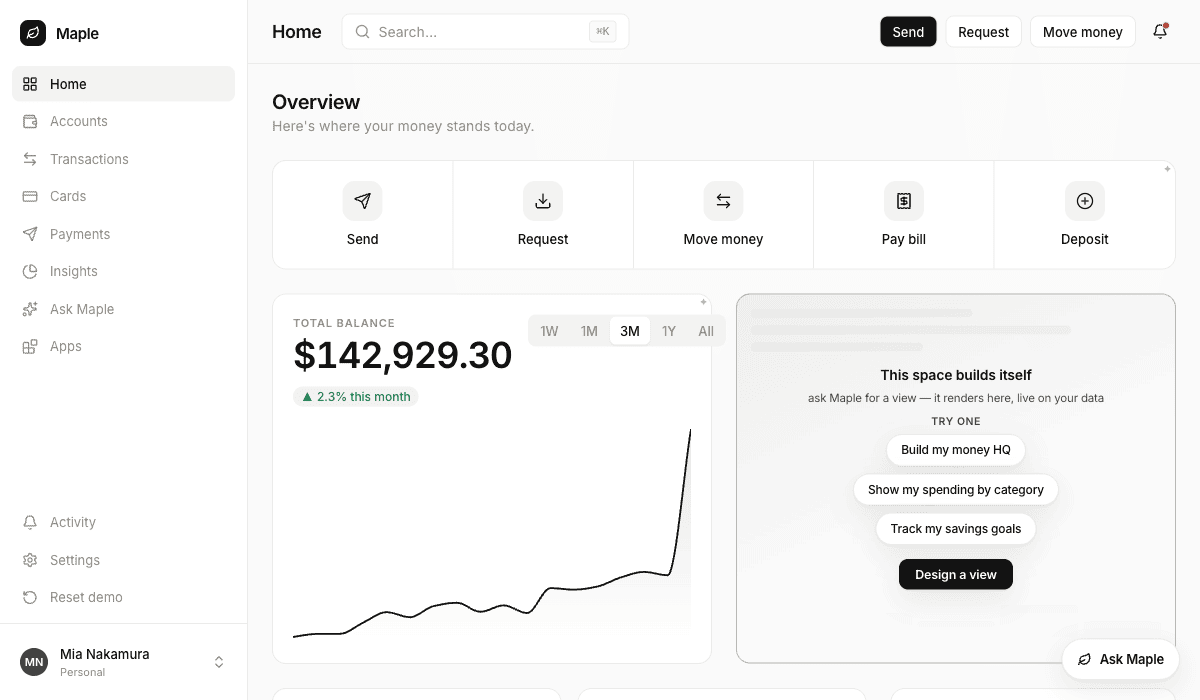
What the whole thing looks like end to end, run against the
demo-bank
host (Maple) with an outside MCP client. Every screenshot below is that run.
1
Sign the agent in
Point the client at the door and let it do the OAuth itself — discovery,
dynamic client registration, PKCE, your login, the door’s consent page:
export VENDO_MCP_URL=https://your-app.example.com/api/vendo/mcpnode examples/mcp-agent/agent.mjs "make me something to watch my spending on"
The client’s tools/list then carries your host actions and the vendo_*
tools together. Nothing about the connection is your code.
2
Show the agent where a view can land
A slot is your markup, and nothing enumerates slots for an outside agent —
so the agent has to be told the id, or the person has to say it. Empty, the
slot is whatever you put in it:
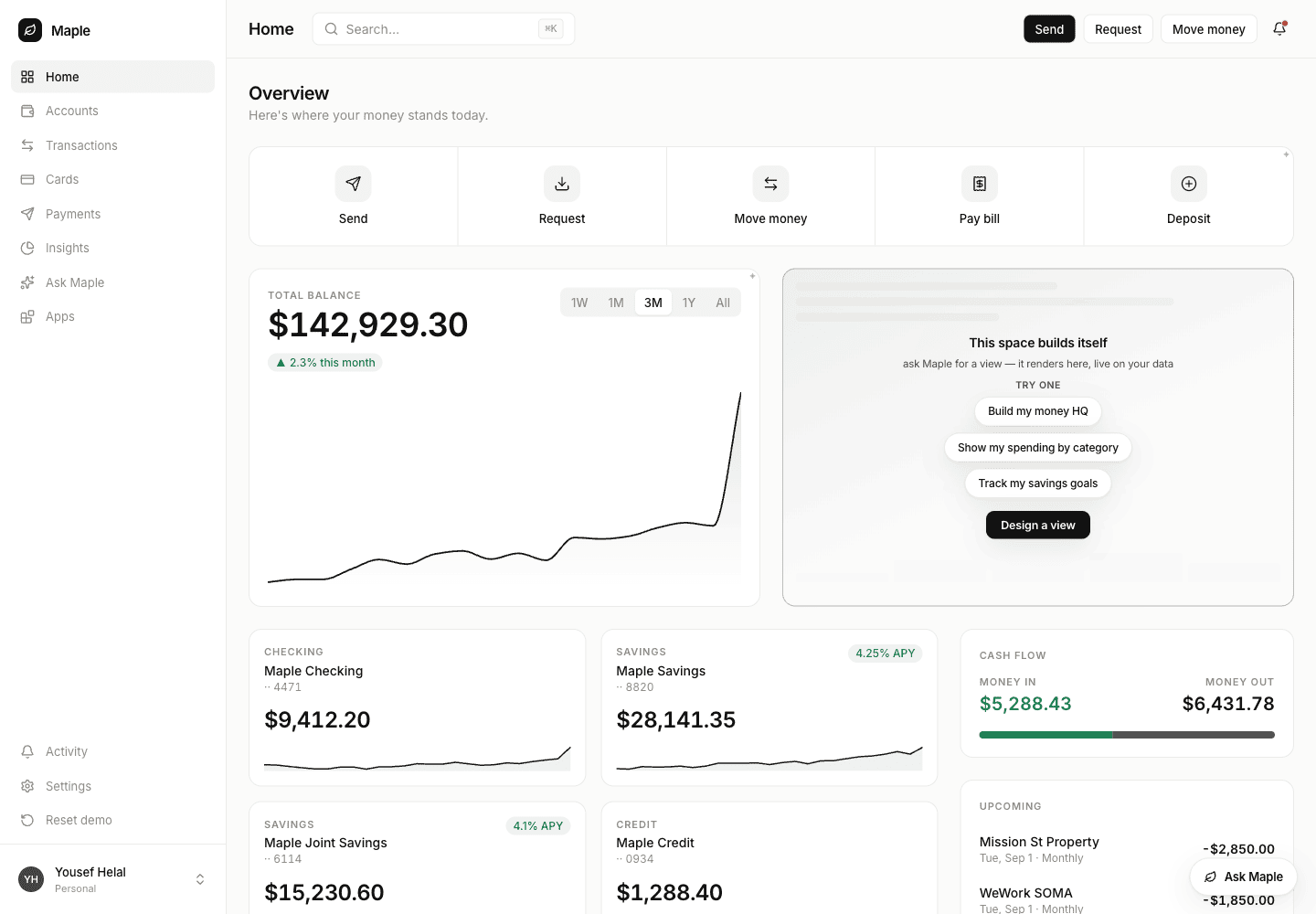
The host's own hero slot before anything is placed — Maple's markup, not Vendo's.
3
Ask for a view with a destination
The person says where it goes, the agent passes that slot id:
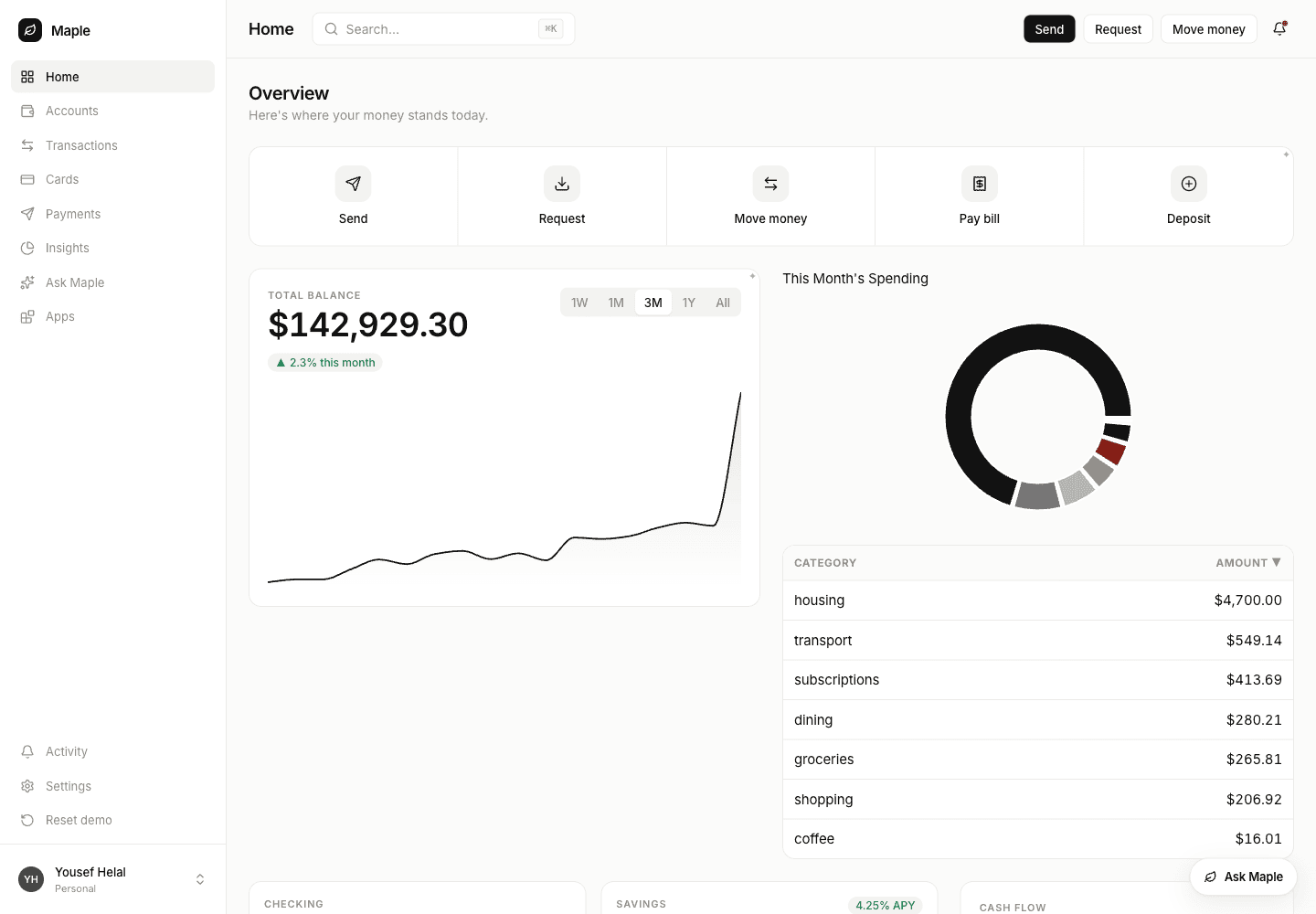
{ "request": "A breakdown of this month's spending by category, largest first", "slot": "home-hero"}
The agent gets back four fields of words. The screen goes to the page, bound
to live host data it read itself — nothing in the request was a number the
agent computed:
The same slot, filled. The figures come from the host's own spending endpoint, read at render time.
4
Or ask with no destination, and place it after
Leave slot out and the screen goes to the person’s apps list. To move it
onto the page later, the agent calls vendo_apps_pin with the app — by id,
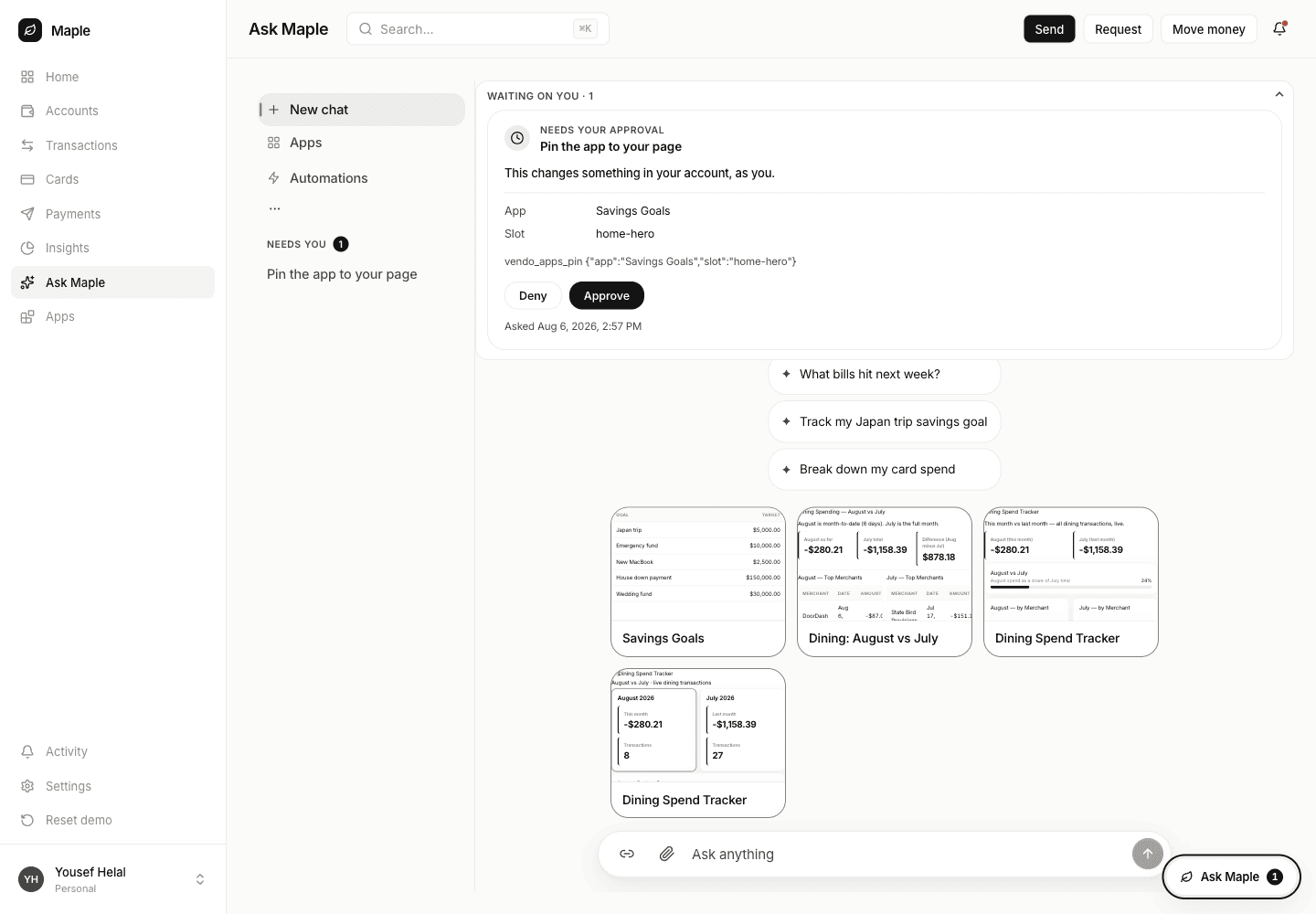
or by the name the person used.That is a write, so under a cautious policy it parks. The person sees the
tool, the app, the slot, and the exact arguments before anything moves:
The parked pin in Maple's approvals queue. The agent is told an approval is pending; nothing has changed yet.
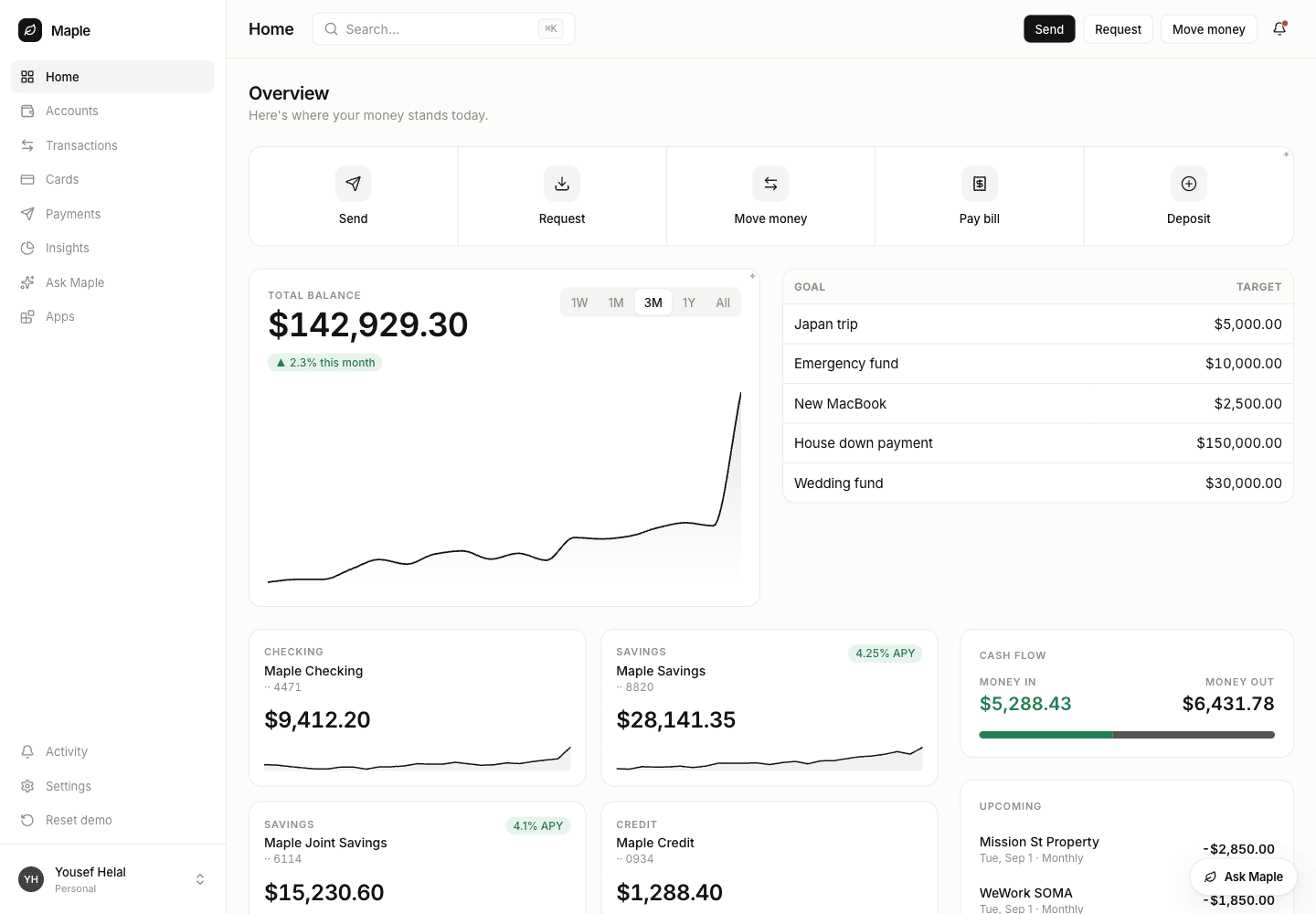
Approve it and the agent’s retry goes through. The reply names whatever was
evicted, so the agent can say what moved:
The pinned app in the hero slot, replacing what held it.
Approving does not resume the parked call — the agent has to call again,
on the same MCP session. The door reuses the parked call’s id for an
identical retry within that session, and the approval is pinned to that
id; a client that reconnects between attempts mints a new id and parks
again. Real clients hold one session for the conversation, so this is
only a trap for scripts that connect per call.
5
Take it back out
vendo_apps_unpin clears the slot. The app itself is untouched — it stays
in the person’s apps and can go back any time — and the slot returns to
your own children:
After unpinning. This is the same screenshot as step 2, because the page really is identical again.
Pass the app id rather than the name if the person has two apps with the
same title: the tool refuses the guess and hands the agent both candidates
to ask about.
6
Check it is per person
A placement belongs to the person who made it. Signed in as a different
Maple user, the same slot on the same page is untouched:
A second user's dashboard. The first user's pinned app is not there, and their apps list is their own.
A build can come back failed, with a reason. The checks floor rejects a
screen whose bindings claim data your host does not return, or whose props do
not type-check — nothing is painted and whatever held the slot stays. The agent
gets that sentence and should retry once on the same app with a narrower
request rather than rebuilding from scratch.Placing is a write, and writes park. Reading is not: on Maple’s policy the
agent’s host_* reads answer straight away, while every vendo_apps_pin and
vendo_apps_unpin waits for the person. Your policy decides where that line
sits — the door adds no exemption to it either way.
Mounted under a path prefix? VENDO_BASE_URL must be the full public base
including that prefix (https://site.com/app), or the door advertises OAuth
endpoints that 404. Two known bugs bite in that configuration today —
#866 (the login redirect and
the consent form drop the prefix) and
#867 — so verify the sign-in
bounce end to end before pointing a real client at a prefixed deployment. A
deployment served at an origin root is unaffected.
Every door call runs the guard-bound registry — policy, approvals, audit —
under the OAuth’d subject. The door adds no second authority path.
A parked call waits in your approvals queue. The agent is told an
approval is pending and moves on; the person approves in your UI, and the
agent learns the outcome on a later turn if it matters.
Door calls reach host routes through the actAs seam, never by forwarding
the MCP bearer. Without a grant or a consent record, the call fails closed.
Returning null from oauth.principal(subject) kills every live session for
that person on the next request.
With the door open, doctor checks both OAuth metadata documents resolve and the
server card parses; GET /status reports blocks.mcp. For an end-to-end proof
with no Vendo code in the agent’s process:
export ANTHROPIC_API_KEY=sk-ant-…export VENDO_MCP_URL=http://localhost:3000/api/vendo/mcpnode examples/mcp-agent/agent.mjs "make me something I can watch this month's spending on"
It prints the receipt, narrates say, and asserts the receipt law itself: if a
tree, components, a machine, or a snapshot ref ever appear in a receipt, it
exits non-zero and says which one.