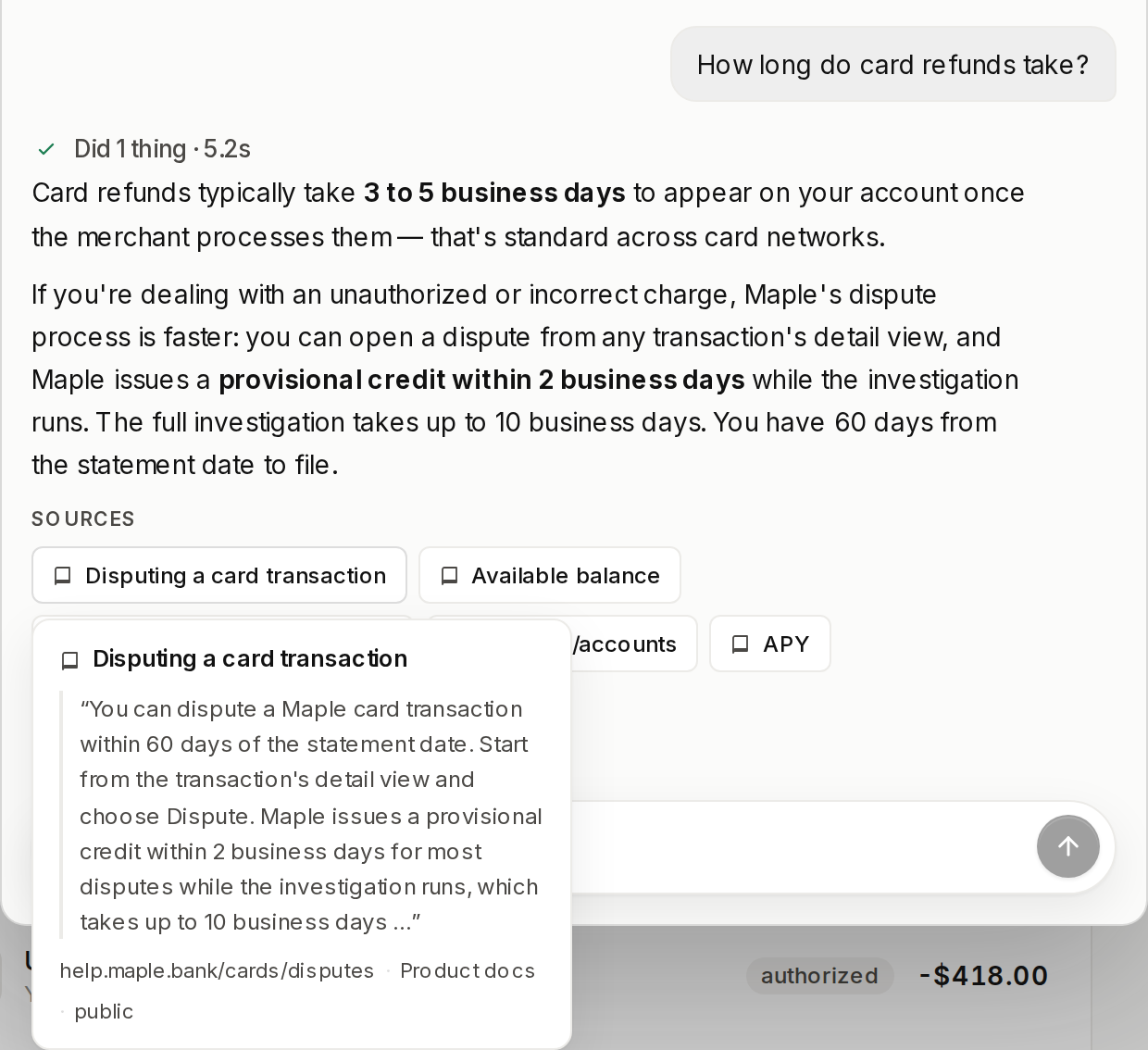
Connect your product documentation and the embedded agent answers how-it-works questions from it instead of from the model’s guesswork. Every grounded answer carries a Sources row of citation chips, and each chip opens the snippet the answer came from. When the docs do not cover the question, the agent says it does not know. You need an app to install into: Next.js or Express. vendo init reads your package.json for a next or express dependency, and with neither present an unattended run (--yes, or any non-TTY caller) exits and names the flag to pass instead of guessing a layout.
1

Wire the routes

Init writes the catch-all route app/api/vendo/[...vendo]/route.ts holding the whole createVendo composition, an empty component registry, and the client mount vendo/vendo-root.tsx. It never edits a file you authored, so the last step is yours — init prints this paste:
That paste is what makes the agent visible, and vendo doctor fails until it lands. See vendo init for the rest of what the command writes.
2

Get a key

You approve the code in the browser and the minted key is written to .env.local — never printed. The key is the whole setup for knowledge: the scaffolded composition leaves the knowledge slot unset, and VENDO_API_KEY fills it with the Vendo Cloud engine. The agent picks up its vendo_knowledge_search tool with no code change.
3

Load your docs in the console

Open console.vendo.run and go to the Knowledge tab. Upload files takes documents straight off your machine. Crawl a URL points the crawler at a docs site you already publish.Indexing is not instant, and the page does not spin while it runs. Right after an upload the tab still reads “0 documents indexed” and the source shows ”—”. Wait a few seconds and refresh; the count then flips to the real number, which is how you know the corpus is searchable.
4

See it answer in the Playground

Still in the Knowledge tab, open Playground and type a question your docs answer — “How long do card refunds take?” rather than a request to do something. The result shows whether the answer clears the evidence bar and which document it cites, with a match score like 0.73.Read it like this: a higher score is a stronger match; the passage under the green Would answer banner is the one the agent answers from; a passage marked Below the bar — retrieved, not cited was found but not used.The Playground proves the corpus without touching your app. In your own app the same vendo_knowledge_search tool runs automatically, and the answer arrives with a Sources row under it — one chip per cited document, each opening the snippet it came from.

Docs in your repo? Keep them synced

If your documentation lives next to your code, push it from the repo instead of uploading it by hand. Syncing to Vendo Cloud needs a recent vendo release.
add only writes a source entry into .vendo/knowledge.json. sync is the one verb that moves content: it ingests the files, diffs them against the sha256 hash manifest at .vendo/knowledge-manifest.json, upserts what changed, removes what vanished, and rewrites the manifest last. A second run over unedited files pushes nothing. --kind says what shape the file is. docs is the default and chunks prose at heading boundaries. glossary and api turn every heading into its own document, which is what makes an exact term lookup return the term rather than a fuzzy paragraph.
Run vendo knowledge sync in CI after a docs change merges, with VENDO_API_KEY set as a secret. Every run names the engine it pushed to, so the CI log records where the docs landed:
The manifest is regenerable and safe to gitignore. A runner without it sees every document as changed and upserts all of them — same corpus, more work. Commit it to keep CI runs incremental. Full verb and flag list: the CLI reference.

No key? Local engine

With no VENDO_API_KEY and no adapter passed, there is no engine and no vendo_knowledge_search tool — the agent never advertises a knowledge base you do not have. Fill the slot yourself with the local lexical engine, which runs keyword retrieval over your own store and needs no keys:
vendoKnowledge() needs no arguments: the composed store is handed to it, so the corpus lands in the project’s default store at .vendo/data. vendo knowledge sync follows the same rule and says so:
That store takes a single-writer lock, so stop your dev server before syncing into .vendo/data, or point both at your own Postgres. An explicitly passed adapter always wins over the key. A Cloud subscriber that writes knowledge: vendoKnowledge() keeps its own engine by construction.
What the agent does when it doesn’t know.
  • The docs don’t cover it. The tool returns insufficient-evidence and the agent says it does not know rather than filling the gap. The turn shows “Searched the knowledge base — no matching documentation”.
  • The engine is down, or the key is wrong. The tool returns unavailable, never an empty result that reads as “nothing found”. The turn says “I couldn’t check the docs just now — the knowledge base is temporarily unreachable, so this answer isn’t verified against the documentation,” and the server log carries the actual cause once per distinct failure.
  • Internal docs stay internal. A source added with --visibility internal answers only trusted host-wired callers. End-user turns never see those documents, and the agent’s prompt index names public sources only, so their existence does not leak either.