> ## Documentation Index
> Fetch the complete documentation index at: https://docs.vendo.run/llms.txt
> Use this file to discover all available pages before exploring further.
# Bring your own agent over MCP
> Let Claude Code, Claude, Cursor, or any MCP client act in your product as the signed-in user: guarded host tools, vendo_make for screens, and the screen landing on your own page.
The [AI SDK](/existing-agents/ai-sdk) and [Mastra](/existing-agents/mastra)
walkthroughs are for an agent you run in process with `createVendo`. Open the
[MCP door](/capabilities/mcp) instead and an agent you do **not** run acts in
your product as the person who signed in, through the same guard, approvals,
and audit your own surfaces use.
Nothing to build on the agent's side: it reads the door's `tools/list` and
calls what it finds — your host actions, and Vendo's own `vendo_make`.
**Status: experimental**, the same label the [MCP door](/capabilities/mcp)
carries: real, guard-bound, covered by protocol-level e2e, but out of the
main [quickstart](/quickstart) until the attended live-client matrix is
green.
## 1. Open the door
Three things, all host decisions, none of them scaffolded by `vendo init`:
`mcp: true`, an OAuth adapter, and the origin-root discovery route.
```ts theme={null}
// lib/vendo.ts
export const vendo = createVendo({
model,
principal: resolvePrincipal,
mcp: true,
oauth, // a HostOAuthAdapter: session() + principal()
});
```
```ts theme={null}
// app/.well-known/[...vendo]/route.ts
import { wellKnownVendoHandler } from "@vendoai/vendo/server";
import { vendo } from "@/lib/vendo";
export const { GET, POST } = wellKnownVendoHandler(vendo);
```
Your existing catch-all route already serves the transport, and
`npx vendo doctor` checks the wiring. The adapter contract and the consent page
are on [MCP door](/capabilities/mcp).
## 2. Connect any client
Hand the client one URL:
```
https://your-app.example.com/api/vendo/mcp
```
The OAuth is nobody's code. The door answers the client's first
unauthenticated request with the RFC 9728 challenge; the client registers
itself through dynamic client registration, runs PKCE, and sends the person to
**your** login and the door's own consent page.
The door also serves a page for people at
`https://your-app.example.com/api/vendo/mcp/connect` — your product's name, the
URL to paste, and per-client steps for Claude, ChatGPT, and Cursor. Link users
to it from your settings.
## 3. Claude Code: install the plugin
Claude Code users can skip the paste. The Vendo plugin is a manifest, the
connection, and one skill:
```bash theme={null}
/plugin marketplace add runvendo/vendo
/plugin install vendo@vendo
```
Point it at your deployment:
```bash theme={null}
export VENDO_MCP_URL=https://your-app.example.com/api/vendo/mcp
```
Signing in is the same OAuth dance, run by Claude Code itself. The skill is the
only thing the plugin adds beyond the connection: when an answer wants to be
looked at instead of read out, how to phrase the request, when to name a
destination, and never to describe a screen it has not seen. Source:
[`examples/claude-code-plugin`](https://github.com/runvendo/vendo/tree/main/examples/claude-code-plugin).
## What the agent gets
| Tool | What it does |
| --------------------------------------------------------- | ------------------------------------------------------------------------------------------------------------------------- |
| `vendo_` | one per host action on the door's menu, guard-wrapped per call |
| `vendo_make` | makes the person a screen from a plain-language request |
| `vendo_apps_list` · `vendo_apps_open` · `vendo_apps_call` | the saved-apps viewer: list them, render one through the MCP Apps shim, and route its interactions back through the guard |
| `vendo_apps_pin` · `vendo_apps_unpin` | put a saved app into one of your product's slots, or clear it |
Your host tools are curated with `surfaces.mcp` in `.vendo/overrides.json`; the
`vendo_*` tools are never curated away. See
[Curate the tool menu](/capabilities/mcp).
### `vendo_make`
| Argument | |
| -------------------- | ------------------------------------------------------------------------------------------------------------------------------------------------------------------------------------------------------- |
| `request` (required) | prose — what the person wants, in the agent's own words. No component names, no layout, and no figures the agent computed: the screen binds live host data itself and hardcoded numbers fail its checks |
| `context` | background the product cannot see from its side: what the person said earlier in that conversation, a constraint they mentioned |
| `app` | change one specific existing app, by id or by the name the person used. Left out, Vendo decides whether to continue the last one or start something new |
| `slot` | the id of a slot in your product. The screen lands there instead of in the person's apps list |
### The receipt law
`vendo_make` answers with four fields of words, never UI:
```json theme={null}
{
"id": "app_790892b0…",
"title": "August Spending",
"status": "ready",
"say": "August Spending is on your screen."
}
```
`say` is one line in the person's voice, written to be said close to verbatim.
`status` is `"ready"`, `"building"`, or `"failed"`, and `"building"` is an
honest answer rather than an error — an escalated build outlives the call, and
there is nothing to poll. The agent never receives the tree, the components, a
payload, or a URL, which is exactly what stops it narrating a screen it cannot
see. **Pixels go server → your page; words go to the agent.**
## Where the screen lands
By default, the person's own apps list in your product. Pass `slot` and it
lands in that spot on your page instead — the same `` your
in-product surfaces fill:
```tsx theme={null}
// app/page.tsx — a slot an outside agent can target by id
import { VendoSlot } from "@vendoai/ui/chrome";
```
Add `@vendoai/ui` as a direct dependency. Empty, the slot renders your own
children; targeted, it shows a build skeleton, then the live screen or the
failure with a retry — no blank hole in any state. One app per slot per person:
placing a second one evicts the first.
Slot ids are yours, and nothing enumerates them for an outside agent: tell the
agent the id, or let the person say it. The plugin skill is taught never to
invent one — an invented id puts the screen where nobody is looking, and that
does not look like an error.
`vendo_apps_pin` and `vendo_apps_unpin` move an app the person already has in
and out of a slot. Both are writes, judged like any other write: under a
`cautious` policy the first one parks in your approvals queue. The routes
behind all three are in [HTTP routes](/reference/http-routes).
Running your own agent in your own backend as well? Its tool outputs render
inline in that chat with `` — see
[Embeds and envelopes](/existing-agents/embeds). Over MCP the slot is the
destination, and the outside agent's own chat stays text.
## Walk through it
What the whole thing looks like end to end, run against the
[`demo-bank`](https://github.com/runvendo/vendo/tree/main/examples/demo-bank)
host (Maple) with an outside MCP client. Every screenshot below is that run.
Point the client at the door and let it do the OAuth itself — discovery,
dynamic client registration, PKCE, your login, the door's consent page:
```bash theme={null}
export VENDO_MCP_URL=https://your-app.example.com/api/vendo/mcp
node examples/mcp-agent/agent.mjs "make me something to watch my spending on"
```
The client's `tools/list` then carries your host actions and the `vendo_*`
tools together. Nothing about the connection is your code.
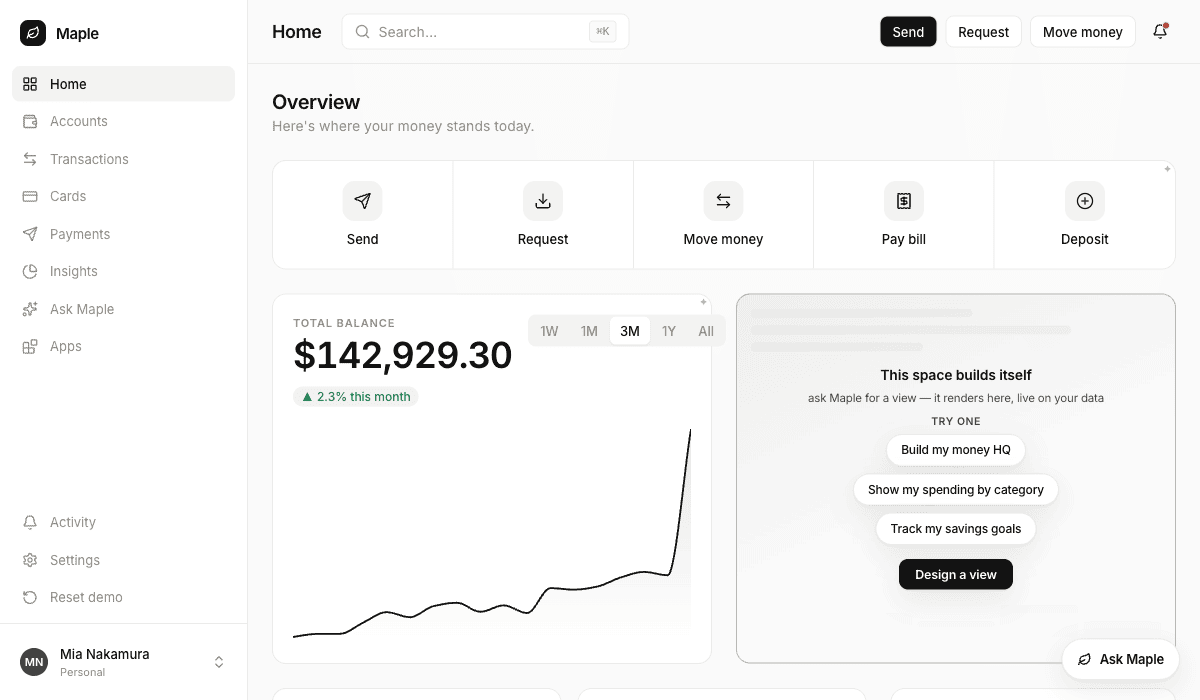
A slot is your markup, and nothing enumerates slots for an outside agent —
so the agent has to be told the id, or the person has to say it. Empty, the
slot is whatever you put in it:
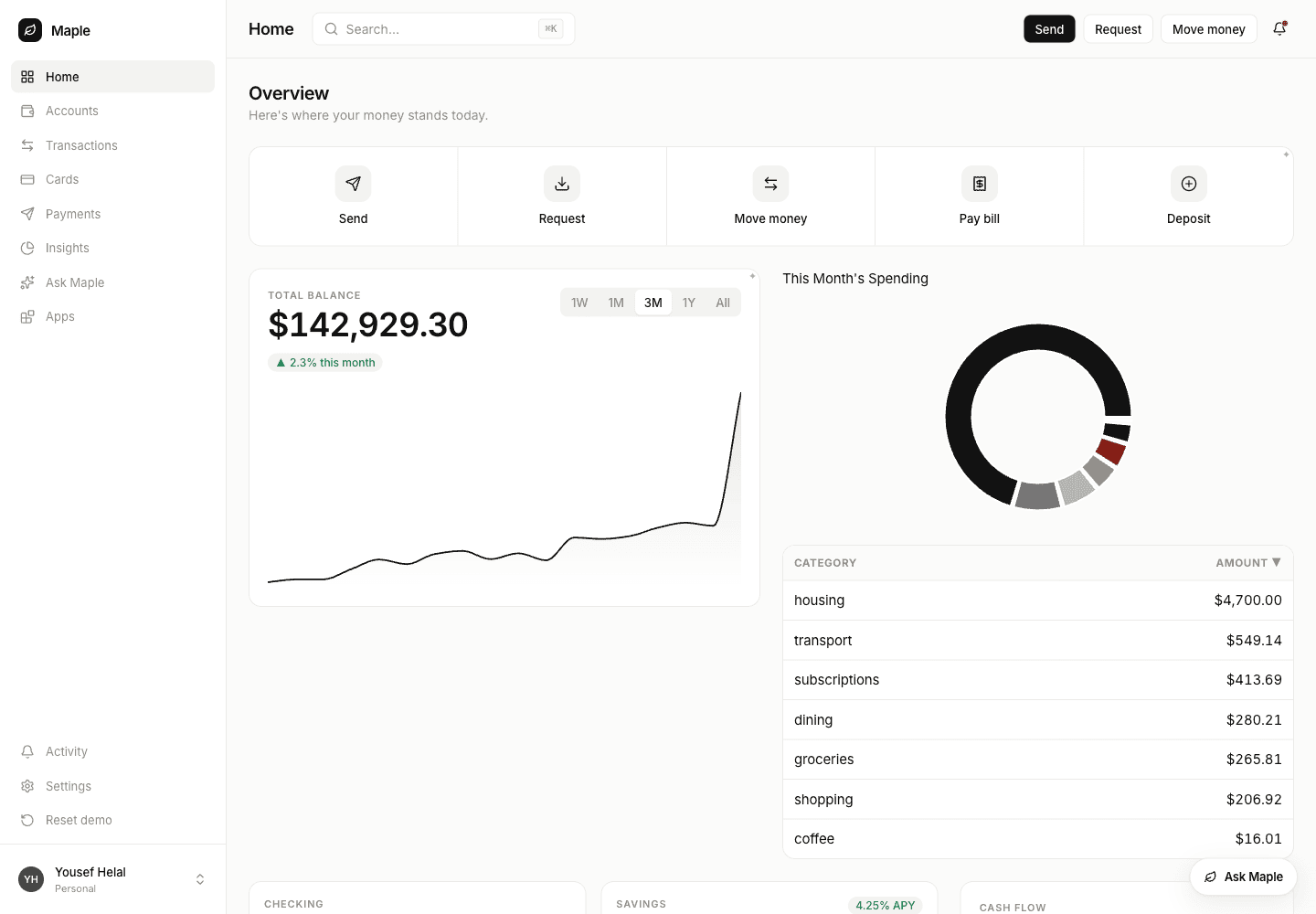
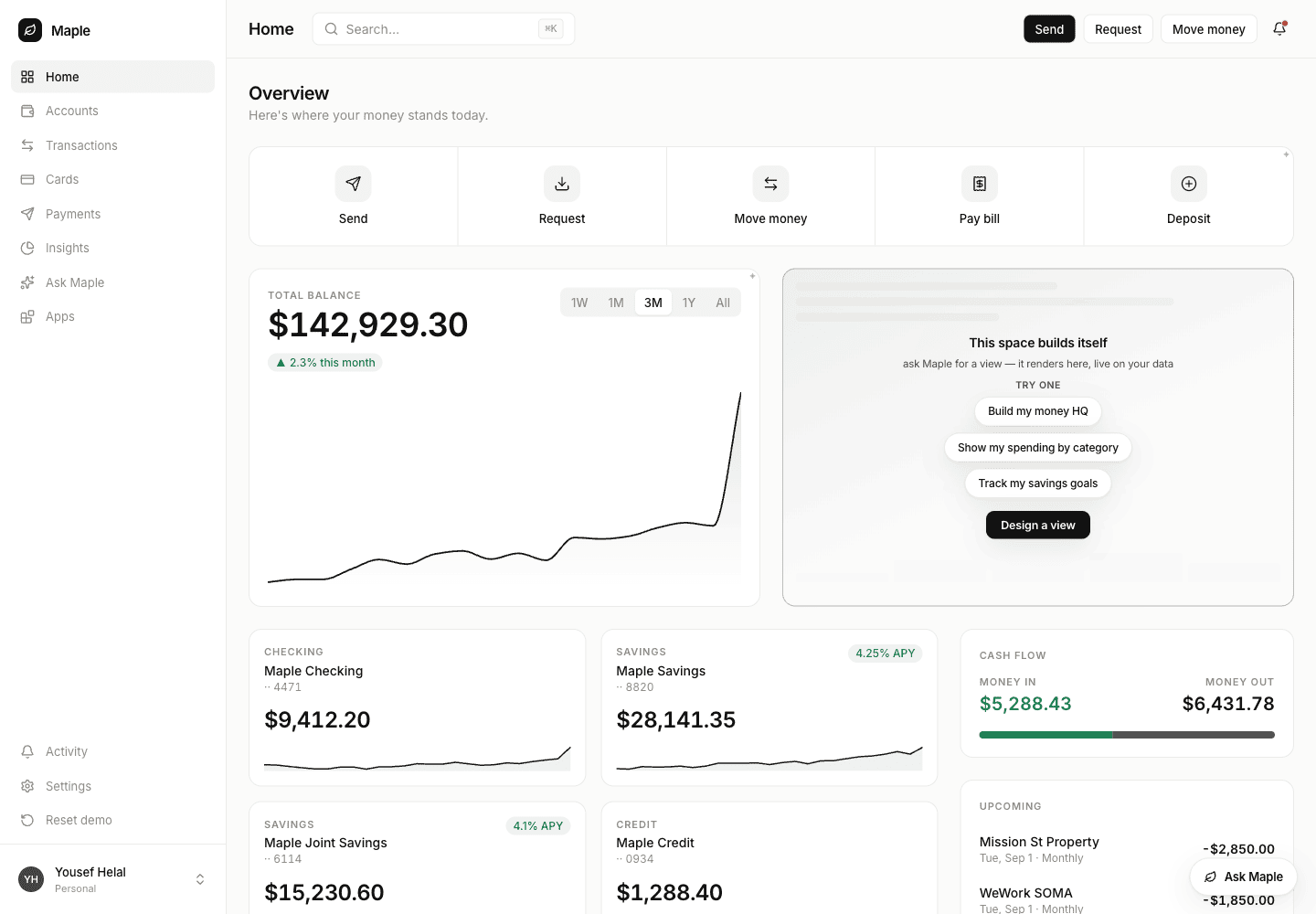 The person says where it goes, the agent passes that slot id:
```json theme={null}
{
"request": "A breakdown of this month's spending by category, largest first",
"slot": "home-hero"
}
```
The agent gets back four fields of words. The screen goes to the page, bound
to live host data it read itself — nothing in the request was a number the
agent computed:
The person says where it goes, the agent passes that slot id:
```json theme={null}
{
"request": "A breakdown of this month's spending by category, largest first",
"slot": "home-hero"
}
```
The agent gets back four fields of words. The screen goes to the page, bound
to live host data it read itself — nothing in the request was a number the
agent computed:
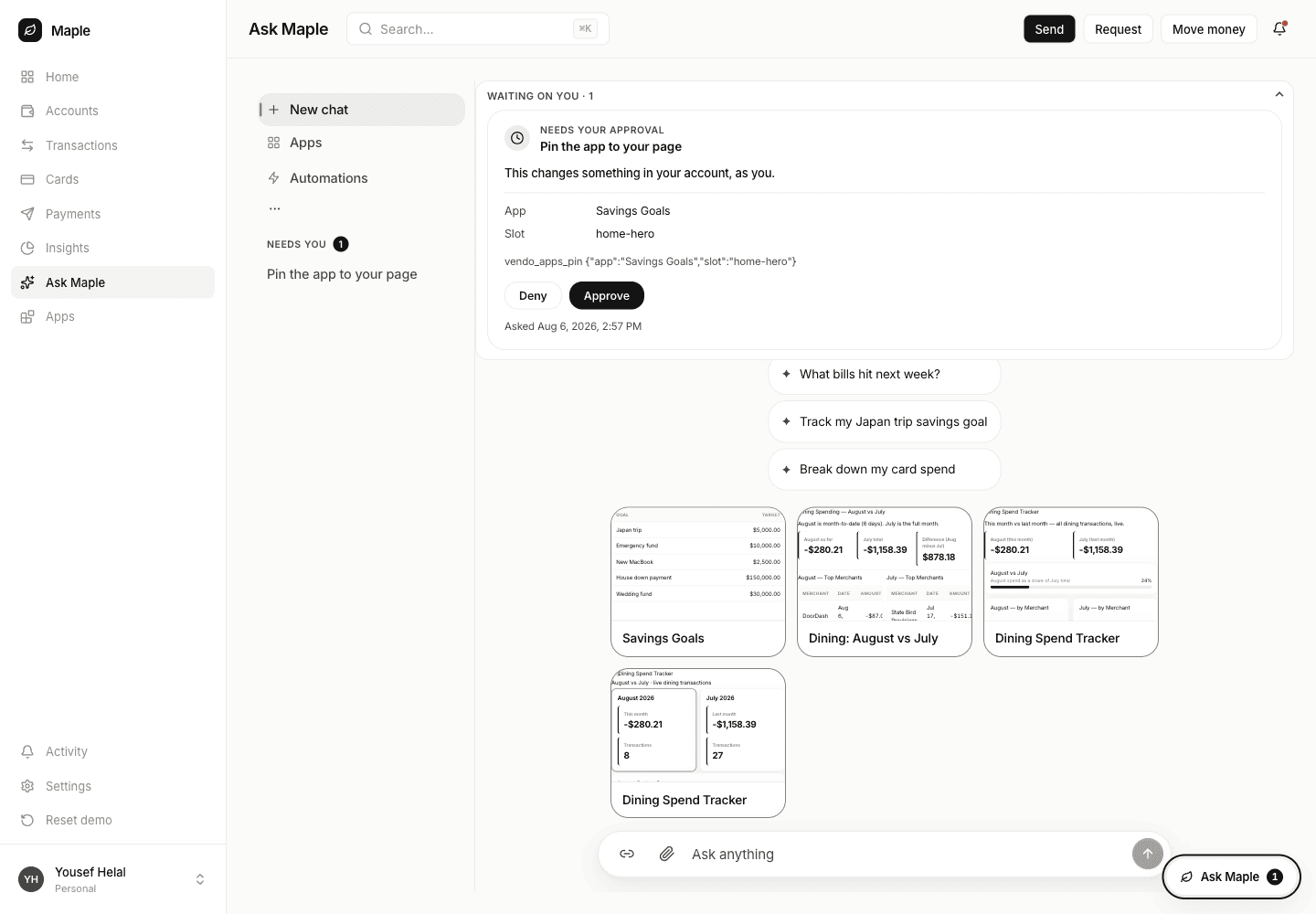
 Leave `slot` out and the screen goes to the person's apps list. To move it
onto the page later, the agent calls `vendo_apps_pin` with the app — by id,
or by the name the person used.
That is a write, so under a `cautious` policy it parks. The person sees the
tool, the app, the slot, and the exact arguments before anything moves:
Leave `slot` out and the screen goes to the person's apps list. To move it
onto the page later, the agent calls `vendo_apps_pin` with the app — by id,
or by the name the person used.
That is a write, so under a `cautious` policy it parks. The person sees the
tool, the app, the slot, and the exact arguments before anything moves:
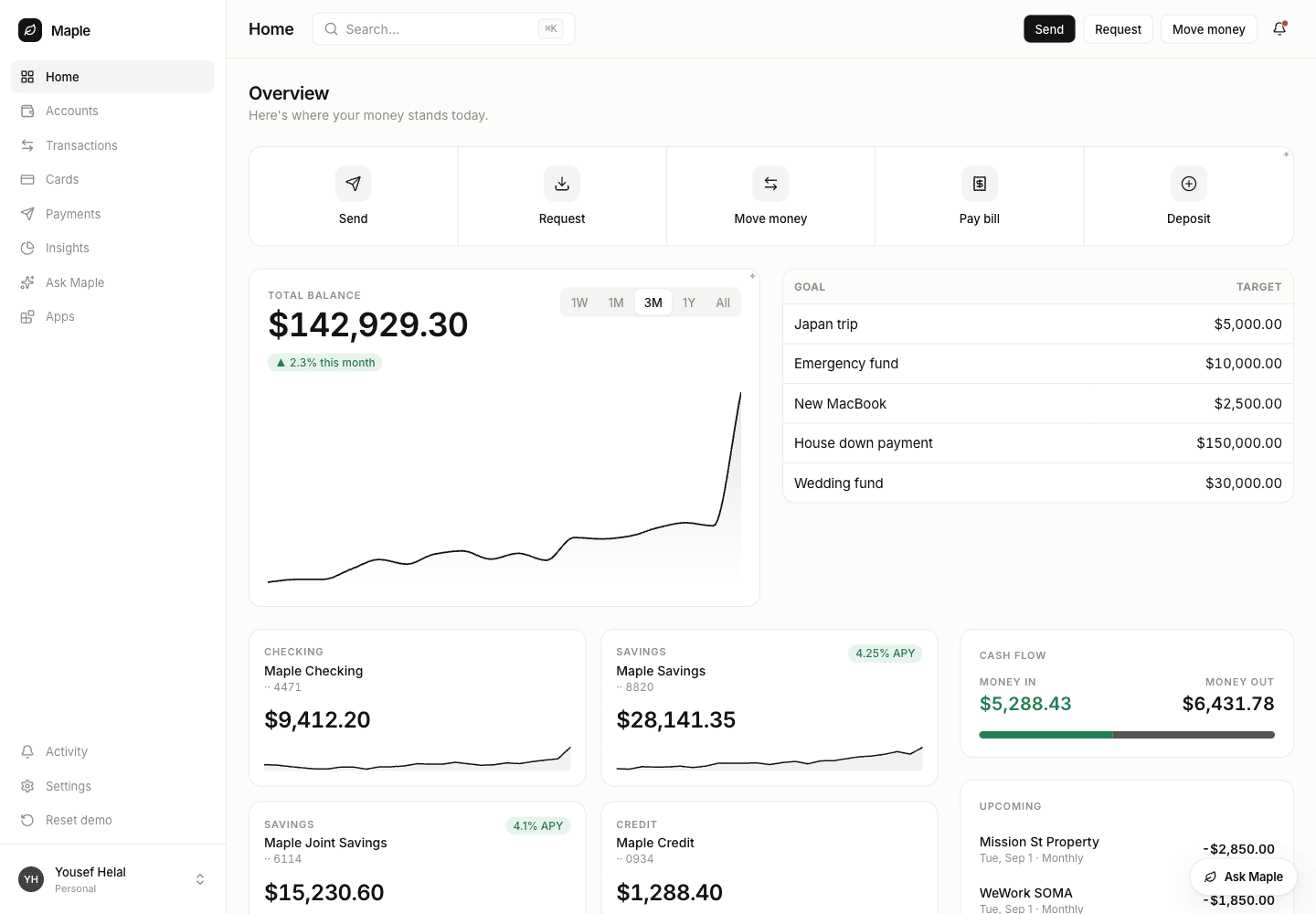
 Approve it and the agent's retry goes through. The reply names whatever was
evicted, so the agent can say what moved:
```json theme={null}
{ "app": "app_5a3948bc…", "slot": "home-hero", "evicted": "app_c0d6b562…" }
```
Approve it and the agent's retry goes through. The reply names whatever was
evicted, so the agent can say what moved:
```json theme={null}
{ "app": "app_5a3948bc…", "slot": "home-hero", "evicted": "app_c0d6b562…" }
```
 Approving does not resume the parked call — the agent has to call again,
**on the same MCP session**. The door reuses the parked call's id for an
identical retry within that session, and the approval is pinned to that
id; a client that reconnects between attempts mints a new id and parks
again. Real clients hold one session for the conversation, so this is
only a trap for scripts that connect per call.
`vendo_apps_unpin` clears the slot. The app itself is untouched — it stays
in the person's apps and can go back any time — and the slot returns to
your own children:
Pass the app id rather than the name if the person has two apps with the
same title: the tool refuses the guess and hands the agent both candidates
to ask about.
A placement belongs to the person who made it. Signed in as a different
Maple user, the same slot on the same page is untouched:
Approving does not resume the parked call — the agent has to call again,
**on the same MCP session**. The door reuses the parked call's id for an
identical retry within that session, and the approval is pinned to that
id; a client that reconnects between attempts mints a new id and parks
again. Real clients hold one session for the conversation, so this is
only a trap for scripts that connect per call.
`vendo_apps_unpin` clears the slot. The app itself is untouched — it stays
in the person's apps and can go back any time — and the slot returns to
your own children:
Pass the app id rather than the name if the person has two apps with the
same title: the tool refuses the guess and hands the agent both candidates
to ask about.
A placement belongs to the person who made it. Signed in as a different
Maple user, the same slot on the same page is untouched:
 ### Two things that are not bugs
**A build can come back `failed`, with a reason.** The checks floor rejects a
screen whose bindings claim data your host does not return, or whose props do
not type-check — nothing is painted and whatever held the slot stays. The agent
gets that sentence and should retry once on the same `app` with a narrower
request rather than rebuilding from scratch.
**Placing is a write, and writes park.** Reading is not: on Maple's policy the
agent's `host_*` reads answer straight away, while every `vendo_apps_pin` and
`vendo_apps_unpin` waits for the person. Your policy decides where that line
sits — the door adds no exemption to it either way.
Mounted under a path prefix? `VENDO_BASE_URL` must be the full public base
including that prefix (`https://site.com/app`), or the door advertises OAuth
endpoints that 404. Two known bugs bite in that configuration today —
[#866](https://github.com/runvendo/vendo/issues/866) (the login redirect and
the consent form drop the prefix) and
[#867](https://github.com/runvendo/vendo/issues/867) — so verify the sign-in
bounce end to end before pointing a real client at a prefixed deployment. A
deployment served at an origin root is unaffected.
## The perimeter does not move
* Every door call runs the guard-bound registry — policy, approvals, audit —
under the OAuth'd subject. The door adds no second authority path.
* A parked call waits in **your** approvals queue. The agent is told an
approval is pending and moves on; the person approves in your UI, and the
agent learns the outcome on a later turn if it matters.
* Door calls reach host routes through the `actAs` seam, never by forwarding
the MCP bearer. Without a grant or a consent record, the call fails closed.
* Returning `null` from `oauth.principal(subject)` kills every live session for
that person on the next request.
## Verify
```bash theme={null}
npx vendo doctor
```
With the door open, doctor checks both OAuth metadata documents resolve and the
server card parses; `GET /status` reports `blocks.mcp`. For an end-to-end proof
with no Vendo code in the agent's process:
```bash theme={null}
export ANTHROPIC_API_KEY=sk-ant-…
export VENDO_MCP_URL=http://localhost:3000/api/vendo/mcp
node examples/mcp-agent/agent.mjs "make me something I can watch this month's spending on"
```
It prints the receipt, narrates `say`, and asserts the receipt law itself: if a
tree, components, a machine, or a snapshot ref ever appear in a receipt, it
exits non-zero and says which one.
## Next
The adapter contract, the consent page, menus, `remoteAs`, federation, and
revocation.
Make the deployed door discoverable through the official registry.
### Two things that are not bugs
**A build can come back `failed`, with a reason.** The checks floor rejects a
screen whose bindings claim data your host does not return, or whose props do
not type-check — nothing is painted and whatever held the slot stays. The agent
gets that sentence and should retry once on the same `app` with a narrower
request rather than rebuilding from scratch.
**Placing is a write, and writes park.** Reading is not: on Maple's policy the
agent's `host_*` reads answer straight away, while every `vendo_apps_pin` and
`vendo_apps_unpin` waits for the person. Your policy decides where that line
sits — the door adds no exemption to it either way.
Mounted under a path prefix? `VENDO_BASE_URL` must be the full public base
including that prefix (`https://site.com/app`), or the door advertises OAuth
endpoints that 404. Two known bugs bite in that configuration today —
[#866](https://github.com/runvendo/vendo/issues/866) (the login redirect and
the consent form drop the prefix) and
[#867](https://github.com/runvendo/vendo/issues/867) — so verify the sign-in
bounce end to end before pointing a real client at a prefixed deployment. A
deployment served at an origin root is unaffected.
## The perimeter does not move
* Every door call runs the guard-bound registry — policy, approvals, audit —
under the OAuth'd subject. The door adds no second authority path.
* A parked call waits in **your** approvals queue. The agent is told an
approval is pending and moves on; the person approves in your UI, and the
agent learns the outcome on a later turn if it matters.
* Door calls reach host routes through the `actAs` seam, never by forwarding
the MCP bearer. Without a grant or a consent record, the call fails closed.
* Returning `null` from `oauth.principal(subject)` kills every live session for
that person on the next request.
## Verify
```bash theme={null}
npx vendo doctor
```
With the door open, doctor checks both OAuth metadata documents resolve and the
server card parses; `GET /status` reports `blocks.mcp`. For an end-to-end proof
with no Vendo code in the agent's process:
```bash theme={null}
export ANTHROPIC_API_KEY=sk-ant-…
export VENDO_MCP_URL=http://localhost:3000/api/vendo/mcp
node examples/mcp-agent/agent.mjs "make me something I can watch this month's spending on"
```
It prints the receipt, narrates `say`, and asserts the receipt law itself: if a
tree, components, a machine, or a snapshot ref ever appear in a receipt, it
exits non-zero and says which one.
## Next
The adapter contract, the consent page, menus, `remoteAs`, federation, and
revocation.
Make the deployed door discoverable through the official registry.